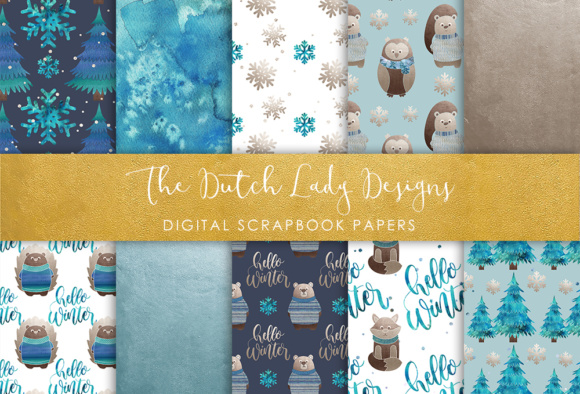
Digital Scrapbook Paper – Winter Forest Animal Friends: Versatile, High-Resolution Designs for Creative Projects
Whether you're designing greeting cards for the holiday season, building a cozy digital photo album of family memories, or crafting a nature-themed blog layout, Digital Scrapbook Paper – Winter Forest Animal Friends delivers both charm and technical reliability. This thoughtfully curated set includes 10 high-resolution JPEG files, each sized at 3600 × 3600 pixels—a perfect 12×12 inch digital canvas at 300 DPI. That resolution isn’t just impressive on paper—it’s essential for crisp printing, smooth layering in digital workflows, and professional-grade output across multiple creative applications.
Why Resolution and File Format Matter—Especially for Digital Scrapbooking
Not all digital papers are created equal. Many free or low-cost downloads come in compressed formats, scaled-down dimensions (like 1200×1200), or saved at 72 DPI—the standard for web display but insufficient for print. With Digital Scrapbook Paper – Winter Forest Animal Friends, you’re getting files engineered for flexibility: 300 DPI JPEGs strike an ideal balance between quality and compatibility. JPEG is widely supported across editing platforms—from Adobe Photoshop and Affinity Photo to Canva Pro and even some advanced mobile apps—so you won’t hit roadblocks importing or layering them.
Because these files are not vector-based or layered PSDs, they’re optimized for immediate use as backgrounds, base layers, or full-page fills. That means faster load times, predictable blending behavior, and straightforward resizing within your editing environment—no need to manage transparency channels or hidden layers unless you choose to add them yourself.
What’s Inside the Winter Forest Animal Friends Set?
The set features ten distinct designs, each evoking the quiet magic of a snow-dusted woodland. Think soft pine boughs dusted with frost, subtle fox silhouettes nestled among birch trunks, owls perched on icy branches, and delicate deer motifs woven into muted evergreen and slate-blue patterns. Colors lean into nature-inspired palettes—deep forest greens, warm charcoal grays, creamy ivories, and cool winter blues—not loud or trendy, but timeless and cohesive.
Each design maintains consistent scale and resolution, so mixing and matching papers across a single project feels intentional, not accidental. You can use one as a background for a holiday card, another as a border element in a digital scrapbook layout, and a third as a textured overlay behind text on a blog header—all without worrying about mismatched proportions or pixelation.
Practical Uses Across Creative Workflows
Digital Scrapbook Paper – Winter Forest Animal Friends shines where versatility meets intentionality. Here’s how real creators are putting it to work:
- Digital scrapbooking: Layer papers beneath photos using blend modes like Multiply or Overlay to add depth without obscuring subjects. Try placing a subtle fox-patterned paper behind a portrait of your child in a red winter coat—the contrast adds warmth and narrative.
- Print-on-demand projects: Because each file is 3600×3600 at 300 DPI, they scale beautifully to standard 12×12 scrapbook pages, 8.5×11 printable cards, or even larger formats like 16×20 gallery prints when used as full-bleed backdrops.
- Digital card making: Use one paper as a base, then cut out a circular photo window using a clipping mask—or duplicate the layer, desaturate it slightly, and reduce opacity to create a gentle tonal backdrop behind handwritten sentiments.
- Websites and blogs: Apply a softened version (reduced opacity + Gaussian blur) as a background texture behind blog sidebars or newsletter signup sections. It adds tactile warmth without competing with text readability.
- Photo album overlays: In tools like Adobe Lightroom or Capture One, import a paper as a preset texture layer—then adjust scale and blend until it enhances, rather than overwhelms, your images.
Editing Considerations: What You’ll Need—and What You Won’t
To get the most from this set, you’ll need image editing software that supports layering, masking, and non-destructive adjustments. Popular options include:
- Adobe Photoshop (industry standard for precision)
- Affinity Photo (powerful, one-time purchase alternative)
- Procreate (for iPad users wanting hand-drawn enhancements over the papers)
- Canva Pro (with upload + transparent layer support for simpler edits)
Important note: These are flat JPEG files, not editable templates. There are no pre-built text boxes, no movable elements, and no smart objects. That’s by design—it gives you full control. But it also means you’ll need basic familiarity with tools like free transform, layer masks, and blending options. If you’re new to editing, start simple: open one paper, place a photo on top, and experiment with opacity sliders before diving into complex composites.
Printing Tips for Best Results
Even with perfect 300 DPI files, printing success depends on more than resolution. For optimal output:
- Use matte or semi-gloss photo paper—especially with the softer, textured designs. Glossy finishes can exaggerate contrast and mute subtle details in fur or snow textures.
- Check your printer’s color profile. Soft-proof in Photoshop using your intended paper manufacturer’s ICC profile to preview how forest greens or icy blues will translate.
- Avoid heavy compression when saving edited versions. If you re-export after editing, choose “Maximum Quality” JPEG settings or save as TIFF for archival use.
- Test print one design first. A small 5×5 inch proof helps catch unexpected shifts in tone or grain before committing to full-size prints.
How This Set Fits Into Modern Creative Habits
Today’s makers juggle multiple roles: designer, storyteller, archivist, marketer, teacher. Digital Scrapbook Paper – Winter Forest Animal Friends supports that fluidity. Its seasonal theme isn’t limiting—it’s grounding. Unlike overly literal “Christmas plaid” or “snowman overload” designs, these papers suggest winter through mood and motif, not cliché. That makes them usable from November through February—and even into early March for “end-of-winter reflection” themes.
They also align with growing preferences for slow creativity: thoughtful composition over rapid templating, tactile-feeling digital textures over flat minimalism, and cohesive collections over isolated one-offs. Having ten coordinated papers means less time hunting for “just one more” match—and more time focusing on what matters: the story, the memory, the message.
Who Benefits Most From This Collection?
This set resonates especially well with:
- Memory keepers who document family milestones and want their digital albums to feel warm, personal, and grounded in natural rhythm;
- Small-business owners creating branded holiday cards, social media banners, or printable planners with a distinctive, non-generic aesthetic;
- Educators and therapists building calming, nature-based visual tools for classrooms or wellness sessions;
- Bloggers and content creators seeking cohesive, downloadable assets to reinforce seasonal editorial calendars without licensing complications;
- Hybrid crafters who blend digital prep (layout, typography) with physical finishing (printing, embossing, stitching).
No matter your role, Digital Scrapbook Paper – Winter Forest Animal Friends offers more than decoration—it provides a consistent visual language. One you can build upon, adapt, and return to, knowing every file meets the same standard of clarity, scale, and creative readiness.