Seamless Kitchen Tools for Real-World Creativity
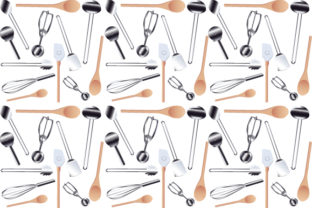
When you’re designing a food blog post, crafting packaging for a small-batch spice blend, or building a social media campaign for a kitchenware startup, visual consistency matters—not as a stylistic afterthought, but as functional clarity. Seamless Kitchen Tools isn’t just another stock image pack. It’s a purpose-built visual resource: a clean, cohesive set of kitchen appliances and tools rendered against a seamless background, delivered in two practical formats—1 vector EPS and 1 high-resolution JPG.
Why “Seamless” Isn’t Just a Design Trend—It’s a Workflow Shift
A seamless background eliminates hard edges, shadows, and distracting context. That means no time spent masking, erasing, or wrestling with uneven lighting in Photoshop. For a freelance food photographer editing client images on tight deadlines, that translates to 8–12 minutes saved per asset. For an educator building printable cooking worksheets, it means dropping a blender or whisk directly into a layout without clipping paths or mismatched tones.
The vector EPS file scales infinitely without pixelation—ideal for large-format print like recipe cards, trade show banners, or instructional posters. The JPG offers fast loading and broad compatibility for web use: email newsletters, Canva templates, or Shopify product pages. Neither requires attribution, licensing tiers, or subscription renewals—just immediate, predictable utility.
Where Seamless Kitchen Tools Fits Into Real Projects
Consider three common scenarios where this set delivers measurable value:
- Bloggers and content creators often juggle dozens of posts monthly. Using Seamless Kitchen Tools, they can maintain a unified visual language across recipe roundups, kitchen tool comparisons, or “pantry essentials” guides—without hiring a designer or learning complex illustration software. A single whisk icon, resized and recolored, works equally well in a Pinterest pin, a Substack header, and a PDF checklist.
- Small business owners launching kitchen-related products face tight budgets and limited design bandwidth. Instead of commissioning custom icons for each appliance (a $300–$600 investment), they use the EPS files to build consistent branding—think labels for olive oil bottles, SVGs for website buttons, or layered mockups for Instagram ads. The uniform lighting and perspective mean tools sit naturally together, even when combined across different layouts.
- Educators and curriculum designers preparing hands-on cooking units for middle school or adult learners need visuals that are clear, neutral, and scalable. The absence of brand logos, textures, or lifestyle clutter keeps focus on function: how a mandoline works, where steam vents on a pressure cooker, or the parts of a stand mixer. That neutrality supports accessibility—reducing cognitive load for neurodiverse learners and ensuring legibility at varied screen sizes.
Not Every Kitchen Visual Needs This Approach
That said, Seamless Kitchen Tools isn’t meant to replace lifestyle photography or detailed 3D renders. If your goal is evoking warmth, nostalgia, or artisanal authenticity—say, a rustic sourdough tutorial with flour-dusted countertops and natural light—this set won’t deliver that mood. Its strength lies in precision, flexibility, and neutrality—not storytelling ambiance.
Similarly, if you regularly need photorealistic close-ups of specific brands (e.g., a particular Vitamix model or Le Creuset color), you’ll still want reference photos. Seamless Kitchen Tools provides generic, proportional representations—not branded replicas. That’s intentional: it avoids trademark complications and supports broader reuse across contexts where brand specificity isn’t required—or desired.
How Format Choice Changes What You Can Do
The inclusion of both EPS and JPG isn’t just about redundancy—it reflects different technical needs. The EPS file opens cleanly in Adobe Illustrator, Affinity Designer, Inkscape, and CorelDRAW. You can ungroup elements, adjust stroke weights, recolor individual parts (e.g., changing a kettle’s handle from stainless to matte black), or export subsets as SVGs for web development. That level of control matters when building a design system or adapting assets for dark-mode interfaces.
The JPG, meanwhile, is optimized for speed and compatibility. At 4000×4000 pixels and RGB color space, it loads reliably in PowerPoint, Google Slides, Mailchimp, and basic CMS editors—even on older devices. No plugins, no font dependencies, no rendering hiccups. For a busy blogger updating five posts before breakfast, that reliability cuts friction more than any “premium” feature ever could.
Who Benefits Most—and Why Timing Matters
Professionals who manage multiple visual touchpoints—freelancers juggling 3–5 clients, solopreneurs handling their own marketing, educators reusing materials year after year—gain the most immediate ROI. They don’t need 500 variations; they need 12–15 core tools (blender, knife, grater, saucepan, etc.) rendered consistently, ready to drop in and adapt.
Timing plays a quiet but critical role. Launching a new meal-planning app? You’ll need clean UI icons fast—no waiting for custom illustration rounds. Prepping a grant application for a community cooking initiative? A professional-looking one-pager with coherent visuals strengthens credibility. Updating holiday email templates? Having assets pre-vetted for size, resolution, and licensing removes last-minute panic.
Hobbyists and home cooks also benefit—but differently. Here, the value shifts from efficiency to empowerment. Someone documenting their first sourdough journey on Instagram doesn’t need pro-level tools, but they *do* need visuals that feel intentional—not amateurish. Seamless Kitchen Tools gives them that baseline polish without requiring design training.
A Thoughtful Fit, Not a One-Size Fix
This set works best when matched to realistic expectations. It won’t automate your entire design process. It won’t replace strategic thinking about color, typography, or audience tone. But it does remove one layer of repetitive labor—the kind that accumulates silently across projects until it becomes a bottleneck.
If you’ve ever spent 20 minutes trying to isolate a coffee maker from a busy background, only to find the shadow looks artificial in the final layout—you’ll recognize the relief of starting with a truly seamless base. If you’ve built a brand style guide only to realize your “kitchen icon set” pulls from five unrelated sources with clashing line weights and inconsistent angles—you’ll appreciate the coherence baked into every element here.
And because the assets are intentionally minimal—not overloaded with decorative gradients, drop shadows, or exaggerated realism—they integrate smoothly with existing brand palettes. A stainless-steel finish can be recolored to match your primary blue; a matte white bowl adapts to both minimalist and warm-toned aesthetics. That versatility isn’t accidental. It’s built into the concept: tools that serve your goals, not compete with them.
Practical Next Steps
Before downloading or purchasing, ask yourself two questions: First, do I regularly create visuals where kitchen tools appear as functional elements—not props? Second, do I value consistency, scalability, and format flexibility over photorealism or stylistic flair?
If both answers are yes, Seamless Kitchen Tools aligns with how you actually work—not how stock libraries assume you should. Keep the EPS for editable, scalable work. Use the JPG when speed, simplicity, and universal compatibility matter most. And revisit the set not as a one-time download, but as a living component of your creative infrastructure—one that quietly improves output quality while reducing decision fatigue, project overhead, and visual inconsistency.