Flowers Seamless Pattern Background: A Practical Guide for Designers and Creators
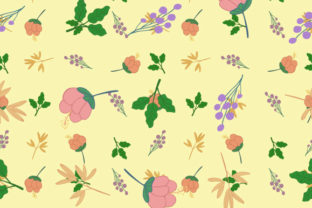
A Flowers Seamless Pattern Background is a digitally crafted repeating design where floral elements—petals, stems, buds, or botanical motifs—are arranged to tile perfectly edge-to-edge, without visible seams or breaks. Unlike standalone floral illustrations or photographs, this type of background is engineered for scalability and repetition, making it ideal for surface design, web interfaces, packaging mockups, textile previews, and print layouts. The version described here includes two file formats: a vector EPS (scalable without quality loss) and a high-resolution JPG (ready for immediate use in raster-based workflows).
What Sets This Flowers Seamless Pattern Background Apart
Not all floral patterns are created equal. What distinguishes this particular Flowers Seamless Pattern Background is its balance of visual softness and technical precision. The white flowers on a light or transparent base provide strong contrast while remaining versatile—neither overly bold nor visually fatiguing. The EPS file ensures clean scaling for large-format prints like wall murals or fabric yardage; the JPG offers pixel-perfect fidelity for digital presentations, social media templates, or UI overlays.
The pattern’s rhythm avoids rigid symmetry. Instead, it uses subtle variation in bloom size, orientation, and spacing—mimicking natural growth rather than mechanical repetition. That small detail matters: it helps the pattern feel organic when tiled across wide surfaces, reducing the “wallpaper fatigue” often seen in overly uniform designs.
How It Compares With Other Floral Background Options
When evaluating floral backgrounds, users typically encounter three broad categories: photographic florals, hand-drawn or watercolor patterns, and vector-based seamless patterns like this one. Each serves different needs.
- Photographic florals offer realism and texture but rarely tile seamlessly without heavy editing. They’re excellent for hero banners or editorial features—but impractical for repeated use across business cards, labels, or app backgrounds.
- Hand-drawn or watercolor patterns bring warmth and artistic character. However, they often lack the crisp alignment needed for precise registration in print production—and may not scale cleanly if delivered only as JPG or PNG.
- This Flowers Seamless Pattern Background occupies a middle ground: it delivers the elegance of botanical illustration with the reliability of engineering-grade tiling. Its vector foundation means no pixelation at any size; its monochromatic palette (white flowers, neutral ground) ensures compatibility with diverse color schemes and branding systems.
Strengths and Real-World Fit
The primary strength lies in adaptability. Because the pattern is built on a light-neutral base—not black, not pastel pink, not warm ivory—it integrates easily into both minimalist and layered compositions. Designers have used it successfully for:
- Invitation suites where text overlays need clarity and contrast;
- E-commerce product mockups (e.g., placing a white ceramic mug against the pattern to suggest a cohesive brand aesthetic);
- Web page section dividers that maintain visual interest without competing with content;
- Stationery templates where consistent, non-distracting texture supports readability.
Its white-flower-on-light appearance also simplifies color customization. In vector-editing software, users can quickly recolor stems or petals using global swatches—making it easier to align with seasonal campaigns or brand refreshes than with fixed-tone photographic assets.
Tradeoffs to Consider
No single pattern suits every context. This Flowers Seamless Pattern Background excels in subtlety—but that same restraint becomes a limitation in scenarios demanding high visual impact. For example:
- Large-scale signage or outdoor banners may benefit from bolder contrast or denser motif repetition;
- Brands with strict dark-mode requirements may find the light-based design less flexible unless inverted manually (which requires vector access and some design fluency);
- Designers needing multi-color floral variations—say, lavender blooms with sage leaves—will need to modify the asset themselves, as only the white-flower version is included.
Also worth noting: while the EPS format supports infinite scaling, it does not include editable layers or named objects by default. Users expecting granular control over individual petals or stems will need to ungroup and restructure elements—a minor but real step beyond drag-and-drop usage.
When to Choose This Over Alternatives
This Flowers Seamless Pattern Background is especially well-suited when you prioritize:
- Consistency across mediums: You’re designing for both web and print, and need one asset that holds up in Figma (via JPG import) and Adobe Illustrator (via EPS).
- Speed without compromise: You’re under deadline pressure but still require professional-grade output—no time to build a custom pattern from scratch or wrestle with seam correction tools.
- Brand neutrality: Your project involves multiple clients or evolving color palettes, and you need a foundational texture that won’t clash or date quickly.
- Accessibility-aware design: The clear separation between flower and background supports legibility when overlaying body text—even at smaller sizes—unlike busier or lower-contrast alternatives.
In contrast, if your work centers on handcrafted authenticity (e.g., artisanal soap labels), or demands rich tonal gradation (e.g., luxury perfume packaging), a scanned watercolor pattern or custom illustration may better reflect your intent—even if it requires more setup time.
Practical Integration Tips
Getting the most from this Flowers Seamless Pattern Background starts with understanding how each format functions in your workflow:
- Use the JPG for quick placement in Canva, PowerPoint, Photoshop, or web CSS backgrounds (
background-image: url(...)). Confirm resolution matches your intended output—300 DPI for print, 72–150 DPI for screen. - Use the EPS when preparing files for commercial printers, creating scalable icons, or adapting the pattern for embroidery digitizing software. Open it in Illustrator, then use Object > Pattern > Make to adjust tile size or spacing if needed.
- To test usability, tile the pattern across an A4 or letter-sized artboard and zoom out to 25%. Look for unintended visual rhythms or gaps—this reveals tiling integrity faster than inspecting at 100%.
One underrated advantage: because the white flowers sit on a transparent or light base, you can layer them non-destructively. Try applying a subtle gradient overlay in Photoshop or adjusting blend modes (e.g., Multiply for richer depth on light backgrounds, Screen for delicate lift on dark ones). That flexibility extends utility far beyond static use.
Making a Confident Choice
Choosing a floral background isn’t just about aesthetics—it’s about matching technical behavior to functional need. This Flowers Seamless Pattern Background answers specific, recurring challenges: reliable tiling, cross-platform compatibility, restrained elegance, and straightforward customization. It doesn’t try to be everything. Instead, it solves a narrow set of problems exceptionally well.
If your current workflow involves stitching together fragments, adjusting opacity to hide seams, or converting raster files to vectors just to scale safely—this asset likely saves time and improves output quality. But if your priority is expressive imperfection, deep tonal nuance, or culturally specific botanical symbolism, exploring hand-crafted or commissioned alternatives remains worthwhile.
Ultimately, the best floral background isn’t the most intricate or the most downloaded—it’s the one that disappears just enough to support your message, scales without complaint, and stays useful across projects months later. For many designers working across branding, publishing, and digital product design, this Flowers Seamless Pattern Background meets that standard with quiet consistency.